
1. PROJECT INTRODUCTION

Simple Sentiment Analysis with Python and Gradio
Source: AI-generated illustration.
1.1. Project Overview and Objectives
Artificial Intelligence (AI) and Natural Language Processing (NLP) are often viewed as complex "black boxes." As newcomers to this field, our team developed the project Simple Sentiment Analysis with Python and Gradio. This is not intended to compete with Large Language Models (LLMs) but serves as an Educational Project.
The core objectives of the project include:
-
Demystifying the NLP Process: Making the data journey transparent—from raw text through cleaning and normalization to the final analysis.
-
Building Explainable AI (XAI): Creating a system capable of answering "Why?". Users don't just receive a result (Positive/Negative/Neutral); they can clearly see the supporting keywords and quantitative charts.
-
Knowledge Sharing: Providing open-source code and basic problem-solving logic, serving as an "introductory lesson" on data structures and programming logic for the beginner community.
1.2. Methodology

rade-offs in model selection: The Lexicon-based method prioritizes transparency and explainability (White-box), while Deep Learning is powerful for complex processing but lacks clarity (Black-box).
Source: AI-generated illustration.
To ensure transparency and control, the project utilizes a Lexicon-based method combined with Rule-based Logic, rather than black-box Deep Learning models. The mechanism rests on three main pillars.
The first is a Multilingual Strategy: using an intermediate translation step to automatically convert input into English, allowing the system to leverage rich, standardized English lexicon resources without building separate datasets for each language. The second pillar is Lexicon Matching, where the system scans the text and matches it against two predefined emotion dictionaries (Positive and Negative). The third pillar consists of Contextual Rules, applying a Window-3 algorithm to handle negations — for example, the phrase "not bad" is flipped to a positive meaning by the algorithm, resulting in higher accuracy than simple word counting.
1.3. Technologies and Tools
The project is built with a minimalist approach, using the open-source Python ecosystem to ensure ease of reading and customization.
Python serves as the primary language for logic and algorithms. Deep-translator & Langdetect are modules for handling language barriers (detection and translation). Gradio is a framework for rapidly building interactive web UIs to visualize inputs and outputs. Matplotlib is a library for plotting charts to illustrate the distribution of sentiment scores.
2. SYSTEM ARCHITECTURE & OPERATING MECHANISM
To transform raw multilingual text into an explainable sentiment result, the Rule-based Multilingual Sentiment Analyzer is designed as a closed processing pipeline, similar to a production line.
2.1. Data Pipeline
Instead of processing each language individually, the system applies a "Centralized Hub" strategy: all input data is translated into English before entering the core logic engine.
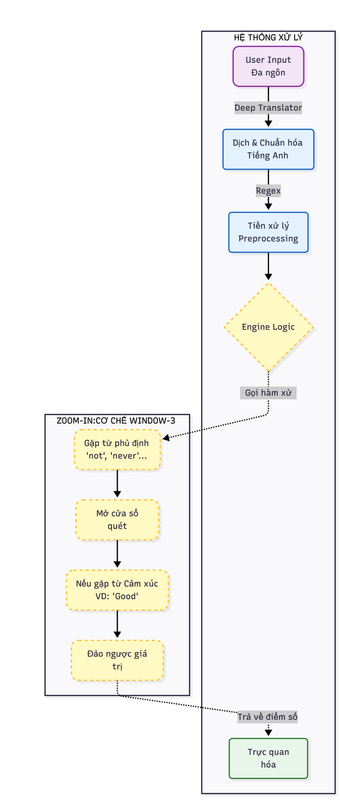
System data flow architecture and negation handling mechanism (Window-3 Logic).
Source: Image provided by the project team.
The pipeline begins with User Input in free-form text. This passes through a Translation Layer that converts to English when necessary, followed by a Preprocessing stage that cleans and normalizes the data. Finally, the Core Logic module performs rule-based sentiment analysis and returns the result.
2.2. Language Processing & Preprocessing
2.2.1. Language Detection & Translation
The system uses specialized libraries to standardize input:
langdetect: To identify the input language.
deep-translator (GoogleTranslator): To translate into English.
Example:
Input: "Món này không ngon"
⬇️
Output: "This dish is not good"
2.2.2. Preprocessing
Before analysis, the text is cleaned through several steps:
- Lowercase: Converting all text to lowercase.
- Regex: Removing special characters and punctuation.
- Tokenization: Splitting the sentence into individual tokens (words).
Ví dụ:
"This dish is not good!"
# → ["this", "dish", "is", "not", "good"]
2.3. Core Logic – Window-3 Algorithm
This is the "heart" of the system, where sentiment decisions are made based on clear, explainable rules.
2.3.1. Dictionaries and Rule Sets
The system defines three critical word sets:
| Word Set | Description | Examples |
|---|---|---|
| POSITIVE | Words with positive nuances | good, great, amazing, excellent, love... |
| NEGATIVE | Words with negative nuances | bad, terrible, awful, hate, poor... |
| NEGATIONS | Negation words | not, never, hardly, don't, isn't... |
2.3.2. Window-3 N-grams Mechanism
While scanning each token:
If NO negation word is found: Sentiment words are scored normally.
If a NEGATION word is found: HThe system activates a 3-word observation window ahead.
Action: If a sentiment word appears in the window → Flip Polarity.
Logic Illustration:
Input: "not very good"
Tokens:
["not", "very", "good"]
- Encounter "not" → Open Window-3.
- Detect "good" within the window.
- "good" (+1) → Flipped to (-1).
👉 Result: Negative
This mechanism significantly reduces common errors found in unigram-based sentiment analysis approaches.
2.3.3. Sentiment Scoring
The final sentiment score is computed based on the balance between positive and negative sentiment signals:
Score = Σ(Positive Signals) − Σ(Negative Signals)
A score greater than zero indicates Positive sentiment; a score less than zero indicates Negative sentiment; a score equal to zero indicates Neutral sentiment. Every contributing word or phrase is traceable, ensuring full transparency and explainability of the model's decision.
2.4. Visualization and Result Interpretation
UI Components:
-
Highlighter Engine
🟢 Green: Positive keywords
🔴 Red: Negative or polarity-flipped keywords -
Sentiment Card
Displays the final sentiment label (Positive / Negative / Neutral) -
Statistical Chart
A bar chart comparing the number of positive and negative signals
Outcome: Users not only see the result, but clearly understand why the system produced that conclusion.
3. SYSTEM IMPLEMENTATION
After understanding the system architecture and operating mechanism, we proceed to apply these concepts in a practical implementation. This section describes the step-by-step process of building a Multilingual Rule-based Sentiment Analysis System for analyzing customer reviews.
Step 1: Environment Setup and Data Structure Definition
The first step is to initialize the working environment and define the core data structures required by the system. Two primary sentiment lexicons are constructed: POSITIVE, a set of words expressing positive sentiment such as satisfaction, quality, or good service; and NEGATIVE, a set of words expressing negative sentiment such as dissatisfaction, complaints, or poor experience. These lexicons act as the foundation of the rule-based sentiment engine.
POSITIVE = {
    # General positive
    "good", "great", "excellent", "amazing", "awesome", "perfect",
    "nice", "love", "like", "enjoy", "satisfied",

    # Quality / experience
    "comfortable", "clean", "cozy", "quiet", "spacious",
    "modern", "beautiful", "convenient", "reliable",

    # Service / people
    "friendly", "helpful", "professional", "polite", "attentive",

    # Food / restaurant / hotel
    "tasty", "delicious", "fresh", "yummy",

    # Value
    "affordable", "reasonable", "worth", "value",

    # Location / travel
    "central", "conveniently", "accessible",

    # Stay / usage
    "pleasant", "smooth", "easy", "fast", "efficient"
}

NEGATIVE = {
    # General negative
    "bad", "terrible", "awful", "poor", "worst", "hate",

    # Quality / condition
    "dirty", "old", "outdated", "broken", "damaged",
    "uncomfortable", "noisy", "crowded", "small",

    # Service
    "rude", "unhelpful", "slow", "careless", "unprofessional",

    # Food
    "tasteless", "cold", "stale", "bland",

    # Value / price
    "expensive", "overpriced", "costly",

    # Technical / facilities
    "slow", "unstable", "laggy", "disconnect",

    # Experience
    "disappointed", "frustrating", "annoying", "problematic"
}
In addition, a language mapping dictionary is defined to provide a user-friendly language selection interface and to supply correct language codes for the translation module. This design allows the system to remain flexible and easily extensible to additional languages in the future.
LANG_MAP = {
    "Auto detect": "auto",
    "Vietnamese": "vi",
    "German": "de",
    "French": "fr",
    "Japanese": "ja",
    "Korean": "ko",
    "Chinese": "zh"
}
Step 2: Language Normalization and Preprocessing
To accurately process multilingual input, the system first standardizes all text into a single common representation. This normalization pipeline consists of three main stages.
1. Input Language Detection
The system automatically detects the input language using probabilistic language identification techniques, ensuring users are not required to manually specify the input language. The detect function uses a probabilistic model based on character n-gram features within the text. To ensure result consistency, the system sets DetectorFactory.seed = 0, eliminating random fluctuations in the probabilistic algorithm and guaranteeing that the same input will always return a single, consistent language code.
from langdetect import detect, DetectorFactory

DetectorFactory.seed = 0

def detect_language(text):
    try:
        return detect(text)
    except:
        return "unknown"
2. Translation into English
Instead of building hundreds of sentiment lexicons for individual languages, the system adopts a standardization approach.
After language detection, all input text is translated into English using the GoogleTranslator library. This allows the sentiment analysis pipeline to operate on a single, unified language, significantly reducing system complexity while maintaining consistency in sentiment interpretation.
from deep_translator import GoogleTranslator

def translate(text, src, tgt):
    try:
        if src in ["auto", "unknown", "zh", "zh-cn", "zh-tw"]:
            return GoogleTranslator(target=tgt).translate(text)
        else:
            return GoogleTranslator(source=src, target=tgt).translate(text)
    except Exception:
        return "[Translation error]"
This mechanism substantially reduces errors commonly observed in unigram-based sentiment analyzers.
3. Data Cleaning with Regular Expressions
In practice, a user comment often contains various types of noise, such as punctuation marks, special characters, or numeric tokens. To make sentiment detection and classification more effective, the system applies text preprocessing using the re library with the re.sub() function.
import re

def sentiment_window3(text_en):  # Details of this function are explained in Step 3
    clean = re.sub(r"[^a-z\s']", "", text_en.lower())  # --> Data cleaning
    ...
Step 3: Negation Handling and N-grams Algorithm (The Core Logic)
In lexicon-based sentiment analysis, the central challenge is not recognizing individual words but understanding their context. A simple unigram approach would score "The service is not good" as Positive upon detecting "good", completely ignoring the preceding "not". To resolve this, the system applies a Window-3 scanning technique.

Illustration of the N-grams mechanism with a context window (Window-3) for negation handling.
Source: Image provided by the project team.
1. Sentiment Flipping Logic
The system defines a clear and rule-based scoring mechanism to handle three primary sentiment states:
| Detected Context | Original State | Post-Negation Logic | Score |
|---|---|---|---|
| NEGATION + POSITIVE | Positive | Flipped to Negative | -1 |
| NEGATION + NEGATIVE | Negative | Flipped to Positive | +1 |
| No sentiment detected | Neutral | Unchanged | 0 |
2. Processing Flowchart

Processing flow of the Window-3 Negation algorithm.
Source: Image provided by the project team.
3. Lexicon Setup & Configuration
First, we define the required vocabulary sets. Among them, the NEGATIONS set plays a critical role, acting as a contextual “switch” that activates the negation-handling logic within the algorithm.
NEGATIONS = {
    "not", "no", "never", "hardly", "rarely",
    "dont", "don't", "cannot", "can't",
    "didnt", "didn't", "doesnt", "doesn't"
}
4. Window-3 Algorithm & Pointer Jumping
This component represents the core engine of the system. Instead of a simple linear scan, the algorithm employs a flexible sliding window mechanism to capture contextual sentiment patterns more effectively.
def sentiment_window3(text_en):
    clean = re.sub(r"[^a-z\s']", "", text_en.lower())
    tokens = clean.split()

    score = 0
    pos_cnt = 0
    neg_cnt = 0
    highlights = {}
    used_indexes = set()

    i = 0
    while i < len(tokens):
        word = tokens[i]
        norm = word.replace("'", "")

        # Negation handling
        if norm in NEGATIONS:
            for j in range(1, 4):
                if i + j >= len(tokens):
                    break

                nxt = tokens[i + j].replace("'", "")
                phrase = " ".join(tokens[i:i + j + 1])

                if nxt in POSITIVE:
                    score -= 1
                    neg_cnt += 1
                    highlights[phrase] = "neg"

                    for k in range(i, i + j + 1):
                        used_indexes.add(k)

                    i += j + 1
                    break

                if nxt in NEGATIVE:
                    score += 1
                    pos_cnt += 1
                    highlights[phrase] = "pos"

                    for k in range(i, i + j + 1):
                        used_indexes.add(k)

                    i += j + 1
                    break
            else:
                i += 1
            continue

        # Normal sentiment
        if i not in used_indexes:
            if norm in POSITIVE:
                score += 1
                pos_cnt += 1
                highlights[word] = "pos"

            elif norm in NEGATIVE:
                score -= 1
                neg_cnt += 1
                highlights[word] = "neg"

        i += 1

    sentiment = "Positive" if score > 0 else "Negative" if score < 0 else "Neutral"
    return sentiment, score, pos_cnt, neg_cnt, highlights
Two key technical points govern the implementation. The used_indexes caching mechanism prevents double-counting: once a phrase such as "not good" has been processed, the token "good" is marked as used, and the condition if i not in used_indexes causes the system to skip it on the next pass. Pointer jumping (i += j + 1) is a performance optimization — after processing a three-word window, the pointer jumps over the entire window rather than advancing step by step, improving efficiency for longer texts.
Step 4: Visualization & Transparency Mechanism (Visualization Engine)
Unlike typical black-box approaches, the primary goal of this project is transparency. Users should not only see a final label such as “Positive” or “Negative”, but also understand the concrete evidence within the sentence that led to that decision.
To achieve this, the system implements three visualization components based on the processed raw data from Step 3.
1. Highlighter Engine (Evidence Highlighting Mechanism)
This is the most critical feature for decoding the algorithm's decision-making process. The system applies HTML injection techniques to insert background colors for keywords that contribute to the sentiment score — green for positive phrases and red for negative or polarity-flipped phrases.

Sentiment Card
Source: Image provided by the project team.
def render_highlight_en(text, highlights):
    spans = []

    for phrase in sorted(highlights, key=len, reverse=True):
        label = highlights[phrase]
        for m in re.finditer(re.escape(phrase), text, flags=re.IGNORECASE):
            s, e = m.span()
            if any(s >= ps and e <= pe for ps, pe, _ in spans):
                continue
            spans.append((s, e, label))
            break

    spans.sort(key=lambda x: x[0])
    result = ""
    last = 0
    for s, e, label in spans:
        color = "#c8f7c5" if label == "pos" else "#f7c5c5"
        result += text[last:s]
        result += (
            f""
            f"{text[s:e]}"
            ""
        )
        last = e
    result += text[last:]
    return f"{result}"
2. Sentiment Card (Status Card)
Instead of displaying plain text output, the system generates a summary card that presents both the overall sentiment state and its corresponding intensity score, allowing users to quickly grasp not only what the sentiment is but also how strong it is.
def sentiment_card(sentiment, score):
    if sentiment == "Positive":
        bg = "#d1fae5"
        icon = "😊"
        symbol = "✔"
    elif sentiment == "Negative":
        bg = "#fee2e2"
        icon = "😠"
        symbol = "✖"
    else:
        bg = "#e5e7eb"
        icon = "😐"
        symbol = "•"

    return f"""
    <div style="
        background:{bg};
        border-radius:20px;
        padding:24px;
        margin-bottom:20px;
        text-align:center;
        color:#000;
        opacity:1 !important;
    " markdown="1">
        <div style="font-size:46px; line-height:1;" markdown="1">
            {icon}
        </div>

        <div style="
            font-size:32px;
            font-weight:800;
            margin-top:6px;
            color:#000;
        " markdown="1">
            {symbol} {sentiment}
        </div>

        <div style="
            font-size:18px;
            margin-top:10px;
            color:#000;
        " markdown="1">
            Score: {score}
        </div>
    </div>
    """

The result card enables users to quickly understand the overall sentiment state.
Source: Image provided by the project team.
3. Statistical Chart (Quantitative Visualization)
A single sentence may contain both praise and criticism. This chart enables users to observe the proportion of sentiment signals, helping them understand why the system arrives at its final conclusion.
def sentiment_chart(pos, neg):
    fig, ax = plt.subplots(figsize=(6, 3))

    ax.bar(["Summary"], [pos], width=0.4, label="Positive")
    ax.bar(["Summary"], [neg], bottom=[pos], width=0.4, label="Negative")

    ax.set_title("Sentiment Signals Overview")
    ax.set_ylabel("Signal Count (rule-based)")
    ax.legend()
    ax.set_ylim(0, max(pos + neg + 1, 3))

    return fig

A chart visualizing the number of detected sentiment signals.
Source: Image provided by the project team.
Step 5: UI Integration & Deployment
To transform the business logic into a practical product, a user interface (UI) is required. This project uses the Gradio library due to its rapid integration with Python and strong support for rendering HTML and charts.
1. Data Pipeline Architecture
Before designing the user interface, a central “orchestrator” function is needed to connect the independent modules developed in Step 3 and Step 4 into a unified processing pipeline.
def analyze(text, lang_choice):
    lang = detect_language(text) if LANG_MAP[lang_choice] == "auto" else LANG_MAP[lang_choice]
    en = translate(text, lang, "en")
    sentiment, score, pos, neg, highlights = sentiment_window3(en)
    return (
        lang.upper(),
        en,
        sentiment_card(sentiment, score),
        sentiment_chart(pos, neg),
        render_highlight_en(en, highlights),
    )
2. UI Design with Gradio Blocks
The interface is built using gr.Blocks to create a multi-column layout, resulting in a clean and professional user interface.
with gr.Blocks(title="Explainable Multilingual Sentiment Analyzer") as demo:
    gr.Markdown("""
    # Explainable Multilingual Sentiment Analyzer
    Rule-based | Negation-aware | Interpretable NLP
    """)

    with gr.Row():
        with gr.Column():
            input_text = gr.Textbox(label="Input comment", lines=5)
            lang_select = gr.Dropdown(
                choices=list(LANG_MAP.keys()),
                value="Auto detect",
                label="Input language"
            )
            btn = gr.Button("Analyze", variant="primary")
        with gr.Column():
            out_lang = gr.Textbox(label="Language")
            out_trans = gr.Textbox(label="English translation", lines=4)

    gr.Markdown("## Sentiment Summary")
    sentiment_html = gr.HTML()

    gr.Markdown("## Highlighted Sentiment (English)")
    highlight_en = gr.HTML()

    gr.Markdown("## Sentiment Overview")
    chart = gr.Plot()

    btn.click(
        analyze,
        [input_text, lang_select],
        [out_lang, out_trans, sentiment_html, chart, highlight_en]
    )

if __name__ == "__main__":
    demo.launch()
- Upload the
app.pysource file

Deploying the application on Hugging Face.
Source: Image provided by the project team.
After a few minutes of building, the application runs directly in a web browser, allowing anyone to interact with and explore the language processing mechanisms developed in this project.

Final Hugging Face user interface.
Source: Image provided by the project team.
4. Conclusion and Future Directions
4.1. Evaluation
The multilingual sentiment analysis system demonstrates clear effectiveness in analyzing short user comments across multiple languages. By adopting a language standardization strategy that translates all inputs into English, the system leverages a unified sentiment lexicon, significantly reducing design and maintenance complexity. Negation handling plays a critical role in improving accuracy, addressing a common limitation of traditional unigram-based models.
The system is easy to deploy and extend, being built on simple data structures and widely adopted libraries, making it suitable for learning, research, and rapid prototyping. It provides effective multilingual support without requiring separate sentiment lexicons per language, and offers a beginner-friendly foundation for learners entering the field of NLP.
That said, the system can only recognize sentiments explicitly defined in the lexicons, potentially missing novel or highly contextual expressions. It does not maintain long-term conversational context or infer deeper semantic meaning, and errors introduced during translation may directly affect sentiment analysis results.
4.2. Future Directions
Although the system performs well in structured, short-text scenarios, two primary directions are proposed for extending it.
4.2.1. Integrating BERT for Sentiment Analysis

BERT architecture overview.
Source: https://www.geeksforgeeks.org/nlp/explanation-of-bert-model-nlp/
One important development direction is the integration of Transformer-based models, particularly BERT (Bidirectional Encoder Representations from Transformers), into the sentiment analysis pipeline. Compared to lexicon-based approaches, BERT can understand bidirectional context by capturing relationships between words across the entire sentence, effectively handle complex negations and diverse grammatical structures, and reduce reliance on fixed lexicons. BERT models can be fine-tuned on labeled sentiment datasets to directly predict sentiment labels for input sentences.
4.2.2. Hybrid Approach (Lexicon-based + BERT)
Rather than completely replacing the current system, a hybrid approach can be adopted to leverage the strengths of both methods. The lexicon-based approach would handle cases with clear sentiment signals, ensuring fast, transparent, and explainable results, while BERT would be used for ambiguous cases or longer sentences where lexicon-based confidence is low. This strategy improves accuracy while preserving system transparency.
References
ScienceDirect. (n.d.). Lexicon-based approach. ScienceDirect Topics. https://www.sciencedirect.com/topics/computer-science/lexicon-based-approach
Taboada, M., Brooke, J., Tofiloski, M., Voll, K., & Stede, M. (2011). Lexicon-based methods for sentiment analysis. Computational Linguistics, 37(2), 267–307. https://www.sfu.ca/~mtaboada/docs/research/Taboada_etal_SO-CAL.pdf
Resources and Source Code
| Platform | Description | Link |
|---|---|---|
| Hugging Face | Online demo — try it instantly without installation | Live Demo |
| GitHub | Full source code — clone and run locally | Source Code |
Chưa có bình luận nào. Hãy là người đầu tiên!