
Part 1: The Pain of Mining Reels Data
1.1 The Irresistible Appeal of Reels
In the era of short-form content, Reels are no longer just an entertainment feature but have truly become a massive “gold mine” of data. Every second, millions of videos generate the latest trends, countless authentic product reviews, and invaluable user insights. Any individual or organization that can capture this data stream will gain a huge competitive advantage.
1.2 The Technical Bottleneck: When Valuable Data Is "Trapped"
However, recognizing the potential is one thing; actually extracting it is a challenge that gives technical people a headache. Completely unlike traditional static text, which is easy to collect and analyze, the Reels platform operates on an infinite scroll mechanism.
The biggest bottleneck lies in the format: all of the most valuable information is tightly “locked away” inside audio streams and sequences of moving images. As a result, ordinary machine systems and analysis tools are almost “blind” to this data repository. We cannot directly query this information or build indexes on a video the same way we do with conventional text-based databases.
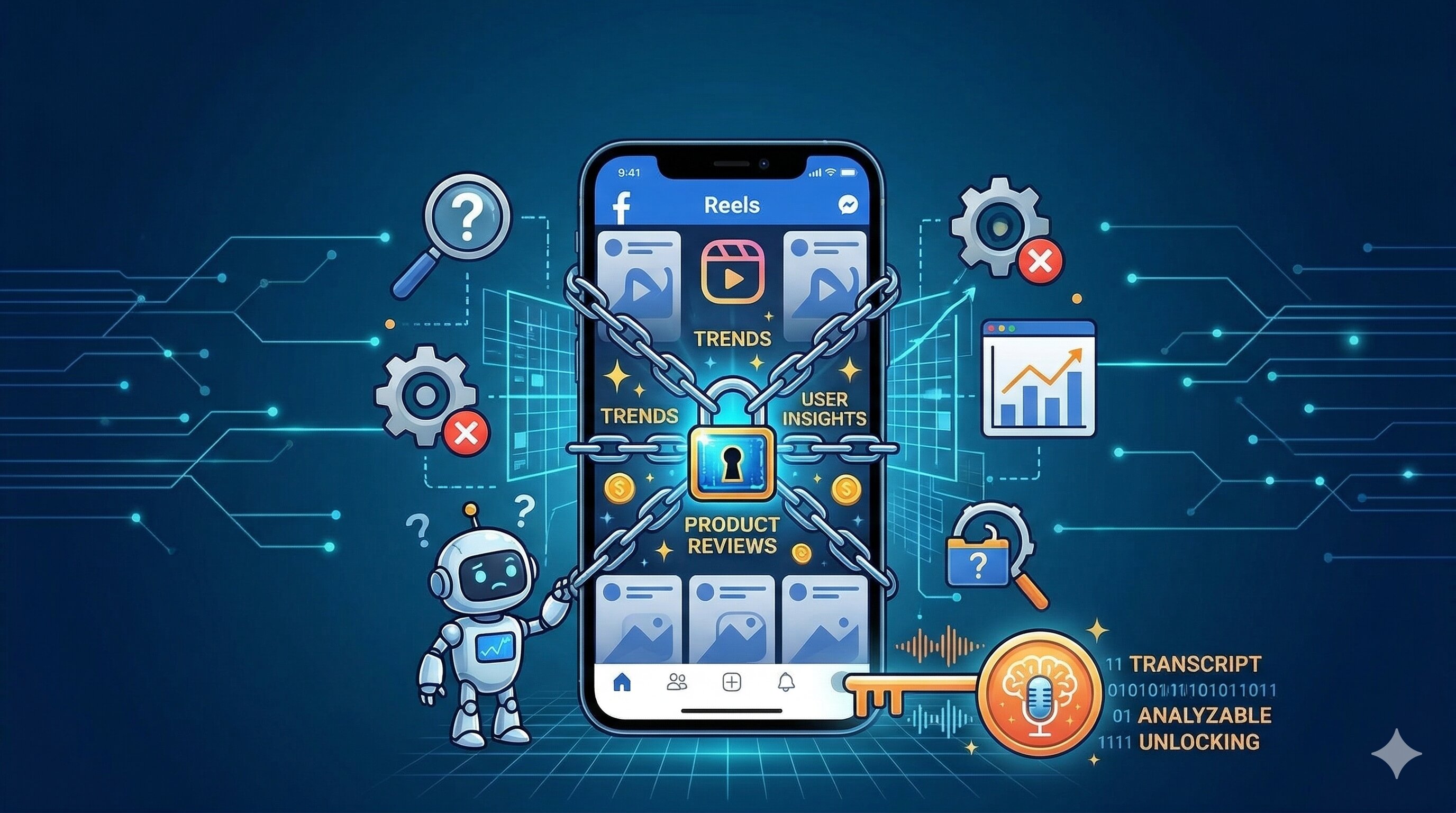
Figure 1.1: Valuable data is “locked” inside multimedia formats, making conventional automated collection systems powerless.(Source: Gemini)
1.3 Proposed Solution: Breaking the Barrier with an AI Pipeline
To unlock this enormous volume of data from video streams, we need an intelligent and systematic processing workflow. The most optimal solution today is to build an automated pipeline with 2 core steps:
1. Collect raw data: Build an automated mechanism to “crawl” and store the original data, including Video and Audio, from the platform.
2. Transform with AI: Apply the power of Artificial Intelligence (such as Speech-to-Text models) to process the raw data, transcribe it, and convert the entire multimedia information stream into text format.
Only when the data is “unlocked” and standardized into text can the technical bottlenecks truly be removed, making it ready for deeper insight analysis.
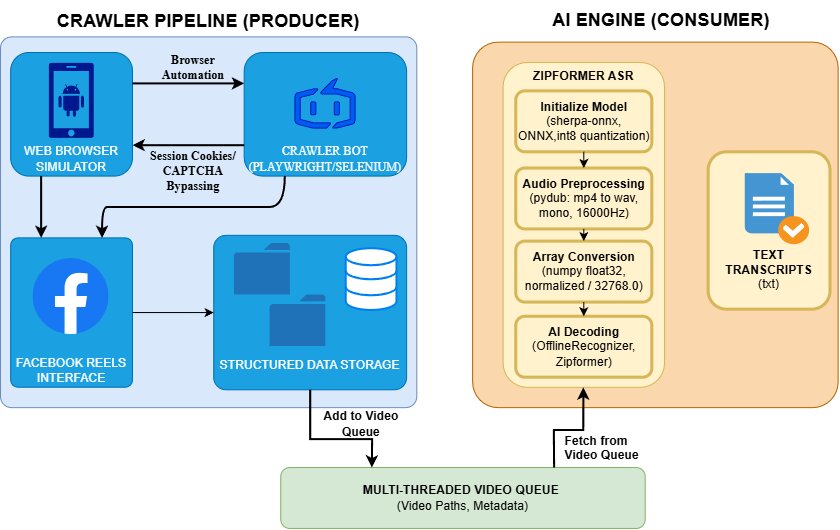
Figure 1.2: Overall architecture flow of the Reels content extraction system, illustrating the Producer-Consumer model between the Crawler (blue) and the AI Engine (orange).
Part 2: Data Collection and Organization (The Crawler Pipeline)
2.1 Overcoming the “Infinite Scroll” Barrier with Playwright/Selenium
Facebook Reels is not a static repository that can be easily downloaded using ordinary HTTP Requests (such as the requests library in Python). Content on this platform is delivered through dynamic loading — new video files are only actually requested when the user scrolls or directly interacts with the interface.
To solve this problem, we need a tool capable of accurately simulating real human behavior. Browser automation libraries such as Selenium or Playwright are perfect for this task. They allow us to program a “bot” that can automatically launch a hidden browser, access the Reels feed, continuously scroll the page to trigger the content loading mechanism, and capture the original video links.
2.2 The "Camouflage" Strategy: Handling the CAPTCHA Barrier
When the automation bot operates at a high frequency, Facebook’s defense system will immediately “sense” abnormal behavior and trigger blocking measures such as CAPTCHA challenges or access restrictions.

Figure 2.1: CAPTCHA illustration
To make the crawler run smoothly and sustainably, we apply an effective “disguise” strategy: Session Cookie Management. Instead of letting the bot automatically enter a username and password — behavior that is very likely to be flagged by the algorithm — we manually log in to Facebook once using a normal browser. Then, the system extracts all cookies from that session and injects them back into Playwright’s automated browser. This approach allows the bot to inherit the authenticated state and bypass automated checks more smoothly.

Figure 2.2: Extracted cookies being used
2.3 Video Downloading and Queue Setup (The Producer)
After the crawler collects the list of URLs, the system directly downloads the .mp4 files to the server. However, if everything is simply thrown into a shared folder, the downstream AI processing stage can easily become messy, hard to track, and prone to bottlenecks.
Therefore, the pipeline is designed to automatically classify and store videos in a standardized time-based folder structure as follows:
dataset/
├── videos/
│   ├── 2026-03-11/
│   ├── 2026-03-12/
The system’s critical bottleneck: As soon as an .mp4 file is successfully downloaded and stored in the folder structure above, the crawler (acting as the Producer) immediately pushes the file path of that video into a multithreaded queue (video_queue).
Thanks to this mechanism, the system does not need to wait until everything finishes downloading. At that point, everything is already ready to be “awakened” by the AI engine.
By applying the above method, we can collect a large volume of data. Below are some illustrative images of the achieved results:
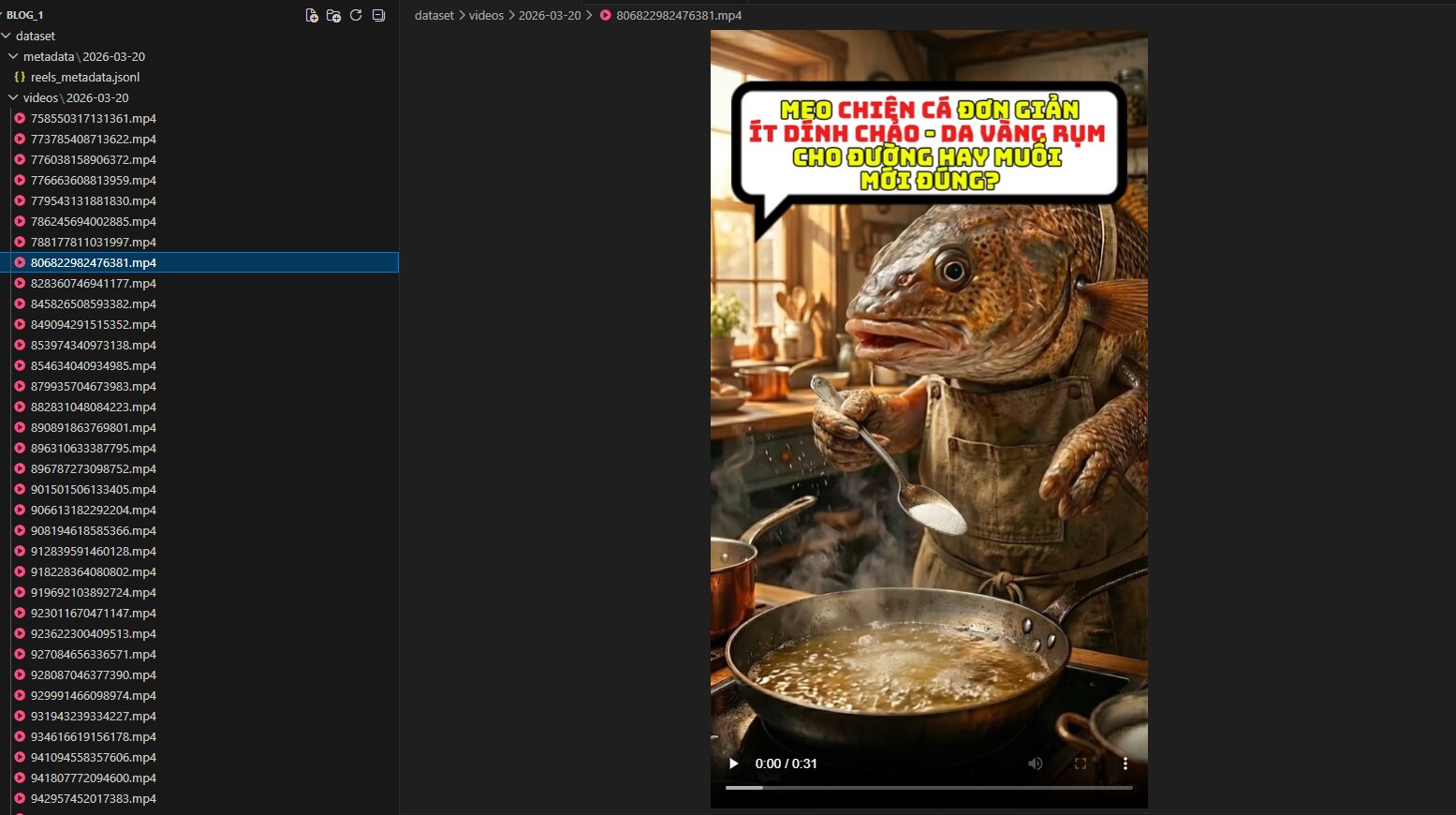
Figure 2.3: The crawler works successfully, downloading and classifying large numbers of .mp4 videos into the correct date-based folder structure.
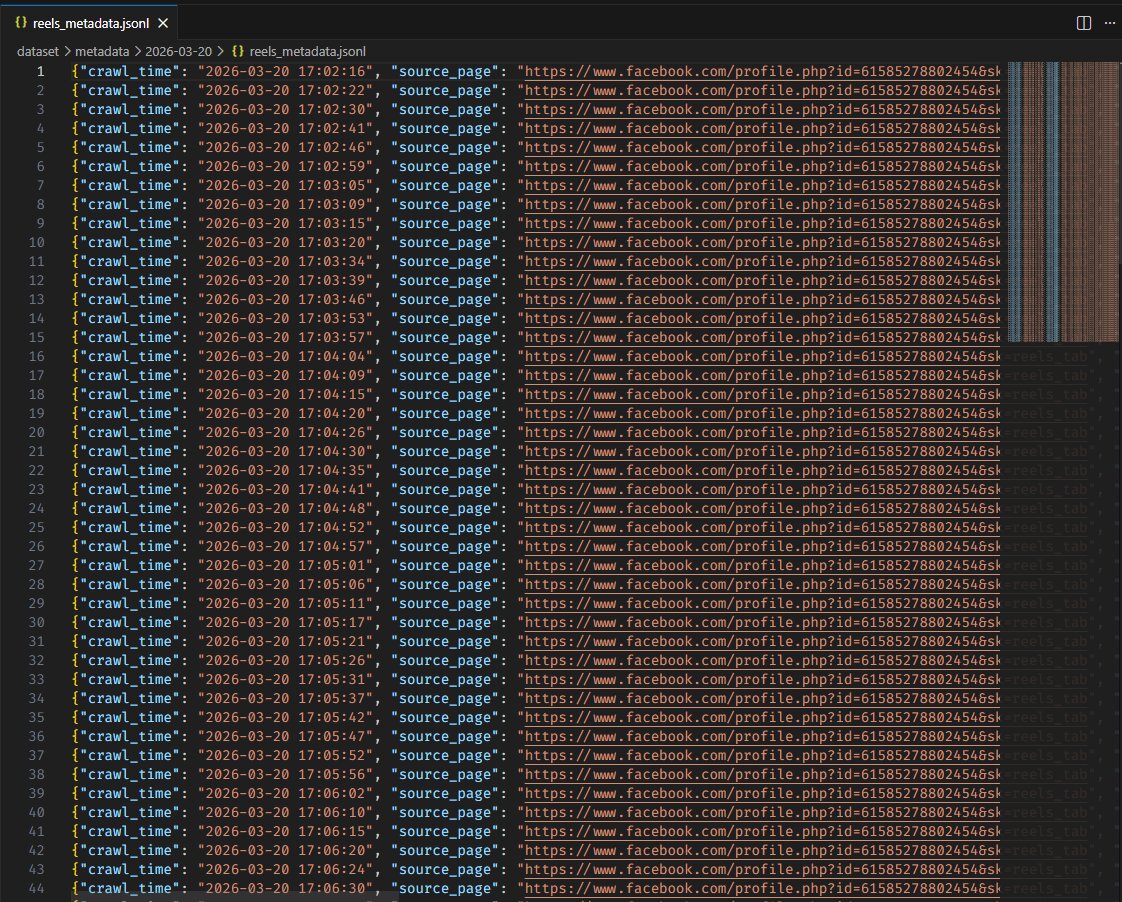
Figure 2.4: The system not only downloads videos, but also successfully extracts a metadata dataset (reels_metadata.jsonl), accurately recording crawl times and original paths.
Part 3: Awakening Data with Zipformer (The AI Engine)
3.1 Performance Challenge: Speed and Resource Optimization
After obtaining thousands of neatly organized Reels video files in Part 2, the real challenge is processing the massive amount of audio without overloading the system. Popular Automatic Speech Recognition models such as Whisper require substantial GPU and RAM resources, which can easily create bottlenecks if run on a standard CPU.
The system uses Zipformer (from the Kaldi ecosystem) as the core component to solve this problem. Zipformer uses a quantized (int8) ONNX format, helping optimize model size and enabling smooth CPU execution at very high processing speeds. At the same time, the model still maintains excellent Vietnamese and multilingual recognition capabilities.
3.2 The Automatic “Transcription” Workflow (The AI Workflow)
The data processing workflow is organized according to a Producer - Consumer model through a multithreaded queue. The crawler continuously collects data, while the AI Worker performs a 4-stage process:
Stage 1: Model Initialization
The system uses the sherpa_onnx library to load the model directly from quantized weight files. Separating the encoder, decoder, and joiner modules helps optimize the inference flow.
recognizer = sherpa_onnx.OfflineRecognizer.from_transducer(
    encoder=required[0], decoder=required[1],
    joiner=required[2], tokens=required[3],
    num_threads=4) # Multi-threaded CPU execution
Stage 2: Audio Reception and Preprocessing
When receiving a new video from video_queue, the AI does not read the .mp4 file directly. Through the pydub library, the system extracts only the audio layer, standardizes it to a 16000Hz sample rate, and converts it into mono format (1 channel). This is the required standard format for the AI model to understand the input.
# Extract and normalize audio
audio = AudioSegment.from_file(video_path)
audio = audio.set_frame_rate(16000).set_channels(1)
audio.export(audio_tmp, format="wav")
Stage 3: Array Conversion
The .wav audio file is then read as frames and converted into a numpy float array (float32). The amplitude is normalized by dividing by 32768.0.
with wave.open(audio_tmp, "rb") as f:
    num_frames = f.getnframes()
    sample_rate = f.getframerate()
    buf = f.readframes(num_frames)
    samples = np.frombuffer(buf, dtype=np.int16).astype(np.float32) / 32768.0
Stage 4: AI Decoding and File Output
Finally, the audio array is pushed into the recognizer’s stream. Zipformer performs inference, decodes it, and returns the raw text result, which is then written directly into a .txt file with the same original name as the video inside the organized folder structure.
stream = recognizer.create_stream()
stream.accept_waveform(sample_rate, samples)
recognizer.decode_stream(stream)
text_result = stream.result.text.strip()
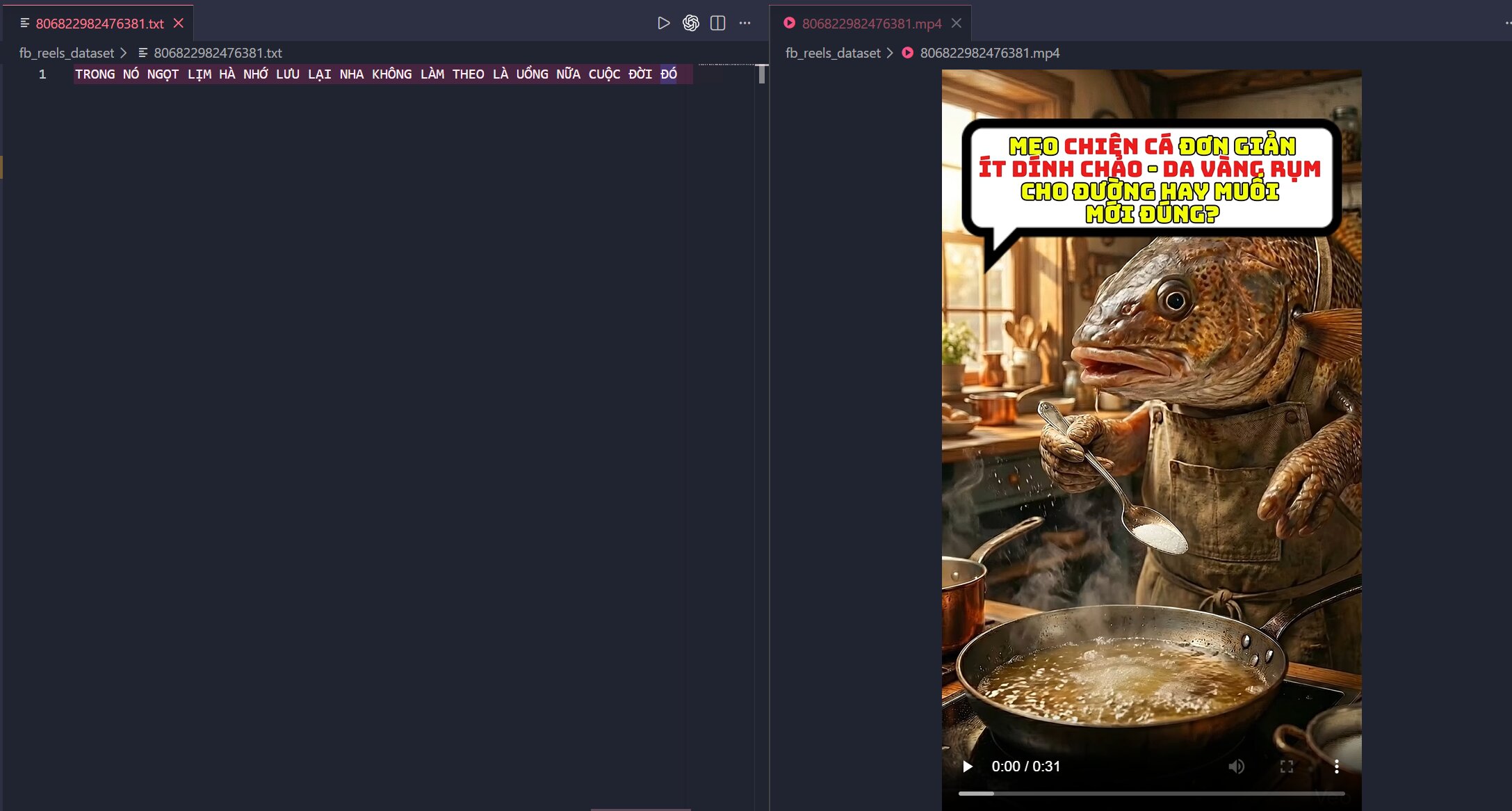
Figure 3.1: Visualization of results at the content level. Demonstrates that the AI has successfully “listened to” and accurately transcribed the speech of a specific video.
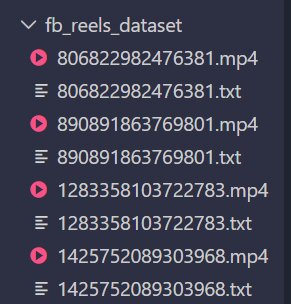
Figure 3.2: Visualization of results at the system level. Demonstrates that the pipeline operates smoothly at scale, automatically mapping .txt files to .mp4 files with the same name.
Part 4: Conclusion & Future Expansion
4.1. Conclusion: The Synergy Between Automation and Zipformer
The process of extracting content from Facebook Reels does not stop at collecting videos; it is the combination of two core components: an automation system for collecting raw data and the Zipformer model for converting audio data into text. In this pipeline, the crawling stage enables access to the highly dynamic Reels data source, while Zipformer plays the central role in transforming difficult-to-extract audio streams into structured transcripts that can be further processed.
Choosing Zipformer as the “heart” of the system is appropriate because this model meets the requirements for processing a large number of audio files at high speed, with low resource cost and convenient integration into an automated pipeline. As a result, the system does not merely collect data, but also transforms Reels data into text format ready for subsequent analytical tasks.
However, it should be noted that the crawling component depends heavily on Facebook’s platform mechanisms and may be affected when the platform changes its anti-bot defenses or dynamic content loading methods. Therefore, the value of the system lies not in absolute stability, but in the flexible approach of combining automation tools and AI to solve a practical problem.
4.2. Future Expansion
The transcripts produced by the system are valuable input data for many different research directions and applications. First, this data can be used for sentiment analysis to evaluate the attitudes of users or content creators toward a specific brand, product, or event. In addition, the transcripts can be fed into keyword clustering or topic classification models to quickly identify prominent content trends on Reels. Further beyond, the system can also be extended to support content search, video summarization, or database construction for digital media analysis.
Chưa có bình luận nào. Hãy là người đầu tiên!