
1. Developing AI Chatbots Today Is More Accessible Than Ever
1.1. Changes in Chatbot Development Approaches
When thinking about building an AI chatbot, many people often assume it is a highly complex task that requires deep expertise in artificial intelligence and machine learning. However, in recent years, the landscape of chatbot development has changed significantly (OpenAI, 2025; Rasiksuhail, 2026).
This transformation stems from two main factors:
First, the emergence of AI services in the form of APIs: Organizations such as OpenAI, Anthropic, and Google have invested billions of dollars to develop extremely powerful large language models (LLMs). Instead of requiring users to build and train models from scratch, these companies provide access to their models through an Application Programming Interface (API) (OpenAI, 2025; Anthropic, 2025; Google AI for Developers, 2026).
Second, the advancement of supporting tools and libraries. Today, integrating AI into applications has become much simpler thanks to optimized frameworks and libraries. This allows developers to focus on business logic rather than worrying about the intricate technical details of machine learning.
1.2. Distinguishing Between AI Model Development and Chatbot Building
One important point to clarify is the difference between developing an AI model from scratch and building a chatbot application (Hire A.I. Developers, 2025).
Developing an AI model requires:
- In-depth knowledge of neural networks and deep learning architectures
- The ability to process and prepare large-scale training data
- Powerful computing resources (GPU clusters, TPUs)
- Significant time and cost for the training process
In contrast, building a chatbot focuses on:
- Designing conversation flows
- Integrating system components
- Managing context and state
- Handling specific business logic
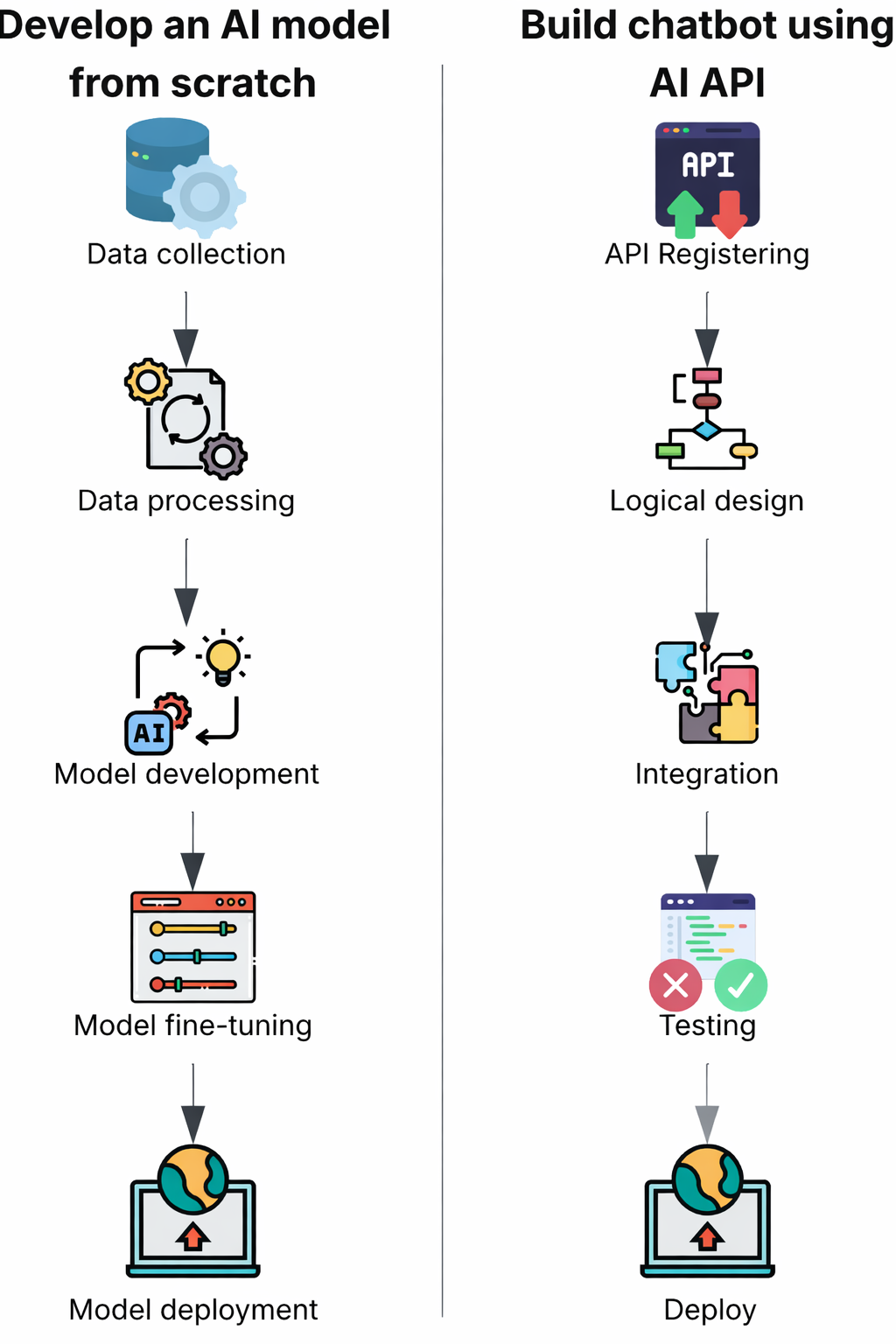
Figure 1.1. Comparison of the processes: "Developing an AI model from scratch" vs. "Building a chatbot using AI APIs"
The process of building a chatbot can be likened to constructing a building:
When building a house, people do not need to produce bricks or cement from raw materials themselves. Instead, engineers and architects focus on designing blueprints, selecting appropriate materials, and organizing efficient construction.
Similarly, when building a chatbot:
- The AI model is like ready-made building materials
- The developer’s job is to design the system architecture
- Connecting the components to create a complete product
2. What Are the Minimum Components of an AI Chatbot?
An AI-based chatbot system is not simply a large language model; it is an integrated system with multiple tightly coordinated components to deliver a natural and effective conversational experience (ScienceDirect, 2025). Below are the four core components essential for a minimal AI chatbot:

Hình 2.1. Rule-based Chatbot
2.1. User Interface
Role: Creating the point of contact between the user and the chatbot system
The user interface is the layer that directly interacts with the end user. Depending on the platform and use case, the interface can be implemented in various forms.
Common types of interfaces:
- Web-based interface: Chat widget integrated into a business website
- Mobile application: Chat interface within a mobile app
- Messaging platforms: Integration with Facebook Messenger, Telegram, Zalo
- Voice interface: Voice-based interface like Siri or Google Assistant
- Command-line interface: Command-line interface for testing and development purposes
Main functions:
- Collecting and standardizing user input (text, voice)
- Displaying responses in an appropriate format
2.2. Logic Processing Layer
Role: Central coordinator and handler of the conversation flow
This is the component that developers primarily implement, responsible for orchestrating the entire process from receiving input to returning the response.
a) Input Data Preprocessing
Before sending data to the AI model, the following standardization steps are necessary:
- Removing unnecessary characters (extra spaces, special characters)
- Standardizing text format
- Basic spell-checking
- Language detection for multilingual systems
b) Conversation Context Management
A high-quality chatbot must maintain context throughout the conversation:
- Storing conversation history
- Tracking the current state of the dialogue
- Managing separate sessions for each user
c) Logic Routing
Deciding the appropriate handling method for each type of request:
- Determining whether a question should be handled by rule-based logic or AI-based logic
- Triggering special functions (database queries, external data retrieval)
- Processing system commands
d) Response Postprocessing
Before returning the response to the user, it needs to be refined:
- Formatting the text
- Checking length compatibility with the platform
- Filtering inappropriate content
Note: Text format standardization is no longer as crucial for modern LLMs; the work will lean more towards Prompt Engineering because newer models have the ability to generalize and understand natural language very well.
2.3. AI Model or Access Service
Role: Natural language processing and response generation
This component provides the ability to understand and generate natural language for the chatbot. There are two main approaches to integrating this component:
Approach 1: Using AI through APIs
This is the most common method in real-world applications. Developers use pre-trained models via APIs (OpenAI, 2025; Google AI for Developers, 2026).
| Provider | Latest Model (January 2026) | Strengths | Limitations |
|---|---|---|---|
| OpenAI | GPT-5.2 (and Pro, Instant variants), gpt-oss (open-weight 120B/20B) | Leading reasoning performance across many benchmarks, strong multimodal support (text, images, voice), context window up to 400K tokens, excellent integration for enterprise and AI agents | High cost for heavy usage, complete dependency on OpenAI infrastructure, some privacy concerns |
| Anthropic | Claude Opus 4.5 (along with Sonnet 4.5, Haiku 4.5) | High safety (constitutional AI), long context (~200K tokens), excellent in coding, AI agents, and domain-specific applications (healthcare, legal), effective hallucination reduction | API speed sometimes slower than competitors, limited multimodal support (primarily text-focused), high cost for flagship models |
| Gemini 3 Pro / Gemini 3 Flash (with Deep Think mode) | Extremely long context (up to 1M tokens), comprehensive multimodal capabilities (text, images, video, audio), deep integration with Google ecosystem (Search, Workspace, YouTube), high speed in Flash variant | High cost for large usage, closed ecosystem, dependency on Google Cloud, some features still experimental | |
| Hugging Face (Open-source hub) | Llama series (Meta), Mistral/Mixtral (Mistral AI), Qwen, Gemma… | Free, open-source, easy to customize and fine-tune, large community support, deployable locally or offline, no vendor dependency | Requires strong computing infrastructure (GPU/server) for efficient performance, no official support or automatic updates, performance may lag behind frontier closed models on some complex tasks |
Table 2.1 Comparison of popular large language model providers (January 2026)
Notes:
- The table focuses on the most advanced and widely used models for developing AI chatbots via API or local customization.
- Context window, cost, and performance may change over time; it is recommended to check the official documentation of each provider before deployment.
- For personal or academic projects, open-source models on Hugging Face often offer a balanced choice between cost and customization capability.
Advantages of the API approach:
- No need for complex infrastructure (such as large GPU clusters)
- Fast deployment and easy scalability
- Models are continuously updated and improved by the provider
- Detailed documentation and good technical support available
Disadvantages:
- Operational costs are usage-based
- Complete dependency on third-party providers
- Potential increased latency due to network communication
- Limited deep customization capabilities
Approach 2: Self-deployment and Model Training
This approach is suitable for organizations with special needs regarding security, customization, or cost.
General process:
- Select base model: Choose a suitable pre-trained large language model, e.g., BERT, GPT-2, LLaMA, Mistral, or newer variants from the open-source community.
- Prepare training data: Collect and process domain-specific data, including labeling if necessary, data cleaning, and formatting suitable for fine-tuning.
- Perform fine-tuning: Retrain the model on the custom dataset, often using resource-efficient techniques such as PEFT (Parameter-Efficient Fine-Tuning), LoRA, or QLoRA to reduce hardware requirements.
- Deploy the model: Host the fine-tuned model on a local server, cloud service, or specialized platform to serve requests.
- Build API wrapper: Create a communication layer (API layer) so other applications can easily call the model through standard endpoints (e.g., REST API or FastAPI).
Advantages:
- Full control over data and information security
- Deep customization capability, optimized for specific domains or tasks
- No dependency on third-party providers
- Operational costs can be significantly lower at large and long-term scale
Disadvantages:
- Requires high expertise in machine learning and deep learning (ML/DL)
- Requires investment in powerful computing infrastructure (especially GPUs or TPUs)
- Development and testing time is much longer than the API approach
- Must take full responsibility for model maintenance, updates, and continuous optimization
2.4. Component 4: Knowledge Base – Optional
Role: Providing domain-specific information that general AI models do not possess
Although large language models have been trained on massive amounts of data, they cannot know about:
- Internal organizational information (product prices, internal policies)
- Real-time data (product inventory, appointment schedules)
- Information updated after the training cutoff date
Benefits:
- The chatbot can answer internal information without needing to fine-tune the model
- Easy to update the knowledge base without retraining the model
- Reduces AI hallucination (fabricated information)
- Enables traceability of information sources
3. Three level of building chatbot
Level 1: Rule-based chatbot
Rule-based chatbot is based on pre-programmed sequence. When user request, chatbot will process and compare the request with pre-defined conditions to respond.
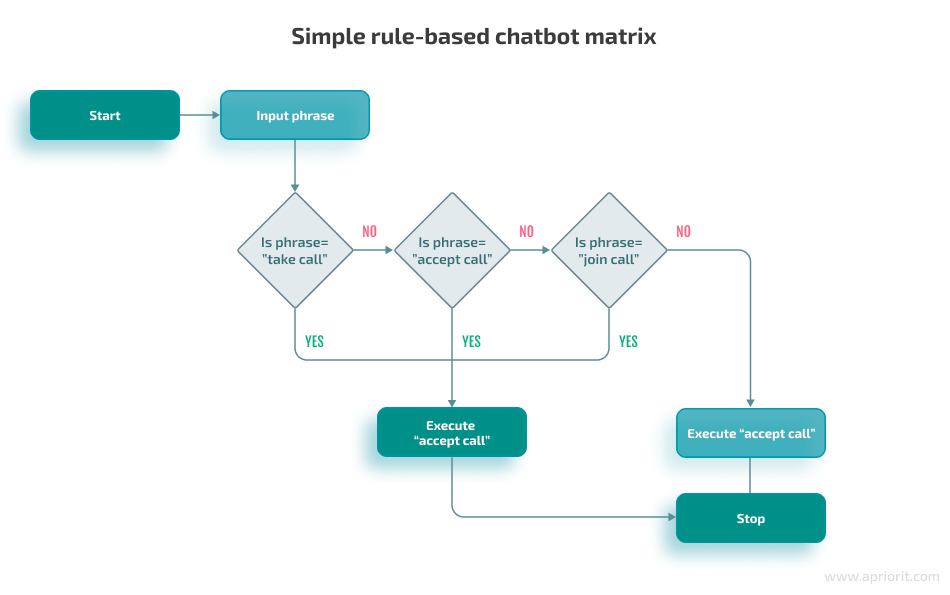
Hình 2.1. Rule-based Chatbot
Application of rule-based chatbot:
- Customer service: Answer FAQs, report order, give suggestions for basic problem.
- Healthcare: Scheduling, report health information, aftercare data for patient.
- Banking: Answer simple request about transaction or banking service.
Advantages:
- With the use of procedure programming, chatbot establishment and deployment is fast and simple, AI training is not required.
- Efficient in processing repetitive tasks, respond quickly leading to manpower saving.
- Fast and accurate response thanks to pre-programming.
- Low development and operating costs.
Disadvantages:
- Unable to answer out-of-scope issues.
- Unable to self-learn, higher development is difficult as company has to add in new feature and update chatbot manually.
- Unable to handle complicated conversation, which lowering user experience.
Development tools:
- By using procedure programming, rule-based chatbot can be developed with programming language such as Python. Conditions are set with if-else control flow or pattern matching.
Level 2: ML-based chatbot
Machine Learning chatbot applies machine learning algorithms and NLP during development process. In contrast to rule-based chatbot, ML-based chatbot feedbacks are smarter and more flexible with AI training instead of pre-programming.
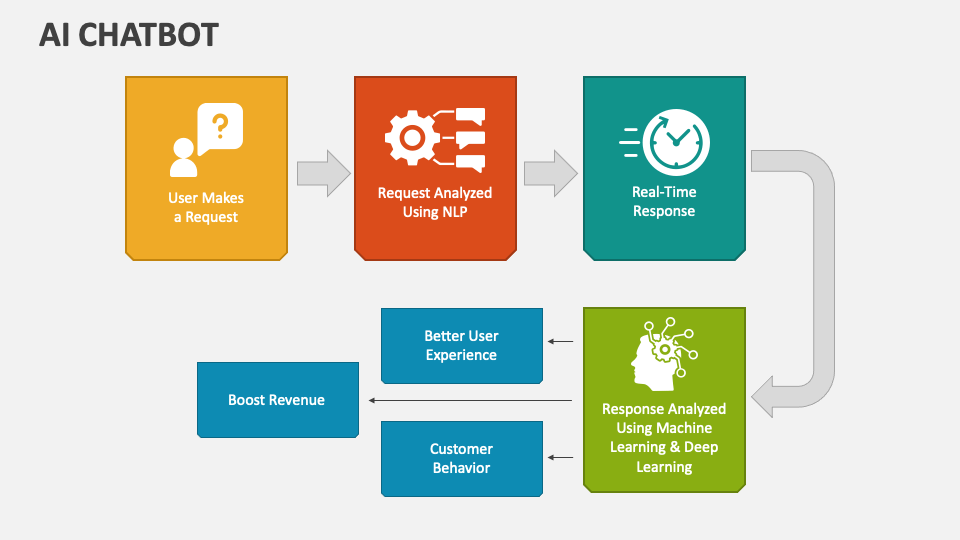
Hình 2.2. Machine Learning-based Chatbot
Applications of ML-based chatbot:
- Similar to rule-based chatbot, ML-based chatbot’s applications are wide spread in customer services, healthcare. However, with machine learning, the responses are much more efficient.
- In customer service, apart from data provision, chatbot is able to suggest additional information based on the conversation.
- In healthcare service, apart from health information, ML-based chatbot can track patient condition and report it to doctors for faster support.
Advantages:
- Chatbot responds more flexible due to being able to understand human language, thus giving more information, which improves user experience.
- Chatbot is able to self-learn throughout processing with customers, thus chatbot is frequently updated
Disadvantages:
- High training cost as well as maintaining cost. Due to using AI, it requires a large amount of high qualities training data in larger fields to train the chatbot.
- Training and deploying chatbot is much more difficult compares to rule-based chatbot.
Development tools:
- Tensorflow, Pytorch: Two large, well-known libraries and frameworks in deep learning to train ML-based chatbot. Including algorithms, libraries to boost the process of building the chatbot.
- spaCy: NLP library for natural language processing.
- Hugging Face Transformers: Platform of many large pre-trained models such as GPR, BERT.
- Rasa: Open-source framework for chatbot, including NLU, intent classification and entity extraction.
Level 3: LLM-based chatbot
LLM-based chatbot can be viewed as an agent operated by Large Language Model. It is trained on a massive data, being able to understand human language, create natural responses and can interact like human.
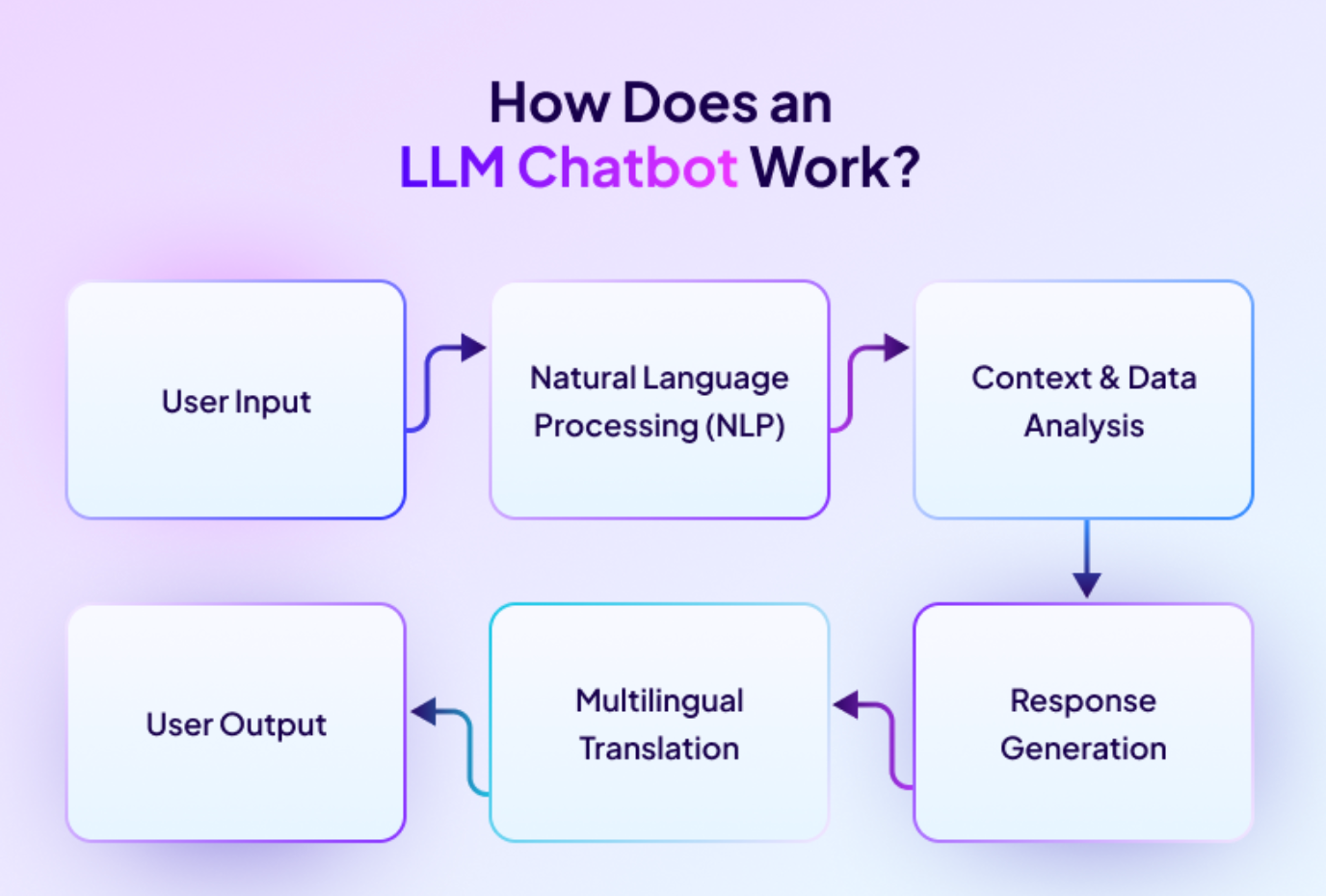
Hình 2.3. LLM-based chatbot
Applications of LLM-based chatbot:
- With LLM, chatbot can be used as an agent to help user in various situations, including customer service and healthcare.
- Helps in explaining policy, a paragraph or document summarization.
- Able to support resolving a technical issue, provide guiding.
- Create contents based on request.
Advantages:
- Deeply understand human language, chatbot is able to respond complicated questions or recommend user with various information and not limited to any contents.
- Be able to process a difficult request, respond generally and can create contents.
- Automate repetitive tasks such as report or summarize information, which helps save time and increases productivity.
Disadvantages:
- LLM chatbot requires large calculating materials as training and deploying LLM requires high quality hardware and infrastructure.
- As intelligent as it should be, it is unavoidable that LLM chatbot may create wrong information due to a bad training process.
Development tools:
- LangChain: Open-source framework that helps build chatbot using large language model.
- Llama: Meta’s open-source large language model.
- OpenAI API: AI model from OpenAI, enable developer to access its model to build chatbot.
- Hugging Face Transformers: Platform of many large pre-trained models.
4. Why do you want to create a chatbot?
4.1 Defining the purpose of the chatbot
In reality, most AI chatbots today can be categorized into one of four main groups.
FAQ Bot – Frequently Asked Questions Bot
This is the most common type of chatbot, often used in customer service.
- Answers repetitive questions: working hours, policies, user guides
- No need for long conversations
- Content is relatively fixed
This type of chatbot is suitable for reducing human workload, especially in customer support systems.
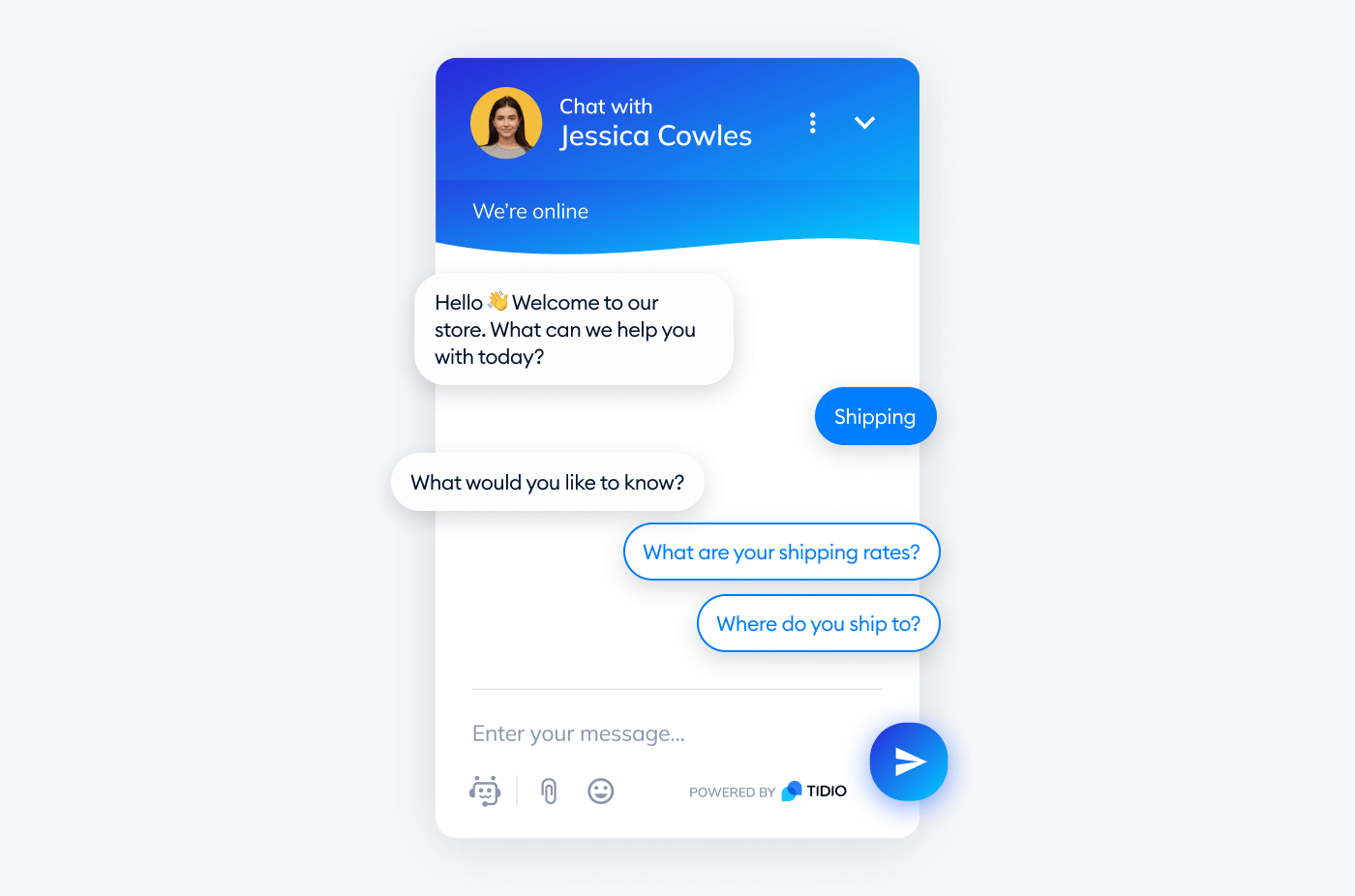
Figure 4.1. FAQ chatbot, Cre: TIDIO
Task-oriented Bot – Chatbot for task execution
Unlike FAQ Bots, this type not only answers but also guides users through a process.
Examples:
- Scheduling appointments
- Booking services
- Step-by-step information lookup
The focus of this type of chatbot is logic and conversation flow, not natural chatting style.

Figure 4.2. Task-oriented Bot, Cre: Sai Gon Eye Hospital
Conversational Bot – Natural conversation chatbot
This type of chatbot is like a “chatting companion.”
- Goal is to maintain conversation
- Responses need to be natural and flexible
- Not necessarily “absolutely correct”
This type is often used for entertainment, emotional support, or social interaction.
However, note: Conversational bots are harder to build than other types, because they require handling context and long conversation history.
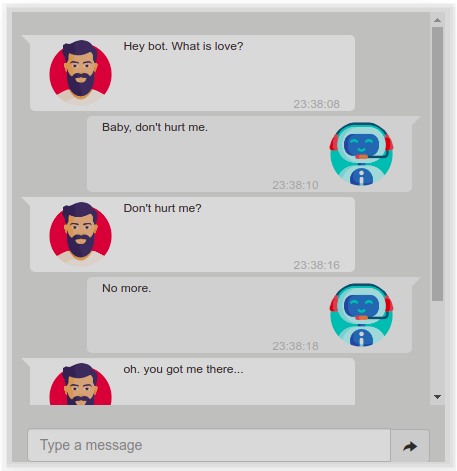
Figure 4.3. Conversational Bot, Cre: Towards Data Science
Domain-specific Bot – Chatbot for a specific field
Chatbots designed for a particular domain such as:
- Healthcare
- Education
- Sales
Characteristics of this type:
- Requires domain-specific data
- Must strictly control content
- Mistakes can cause serious consequences
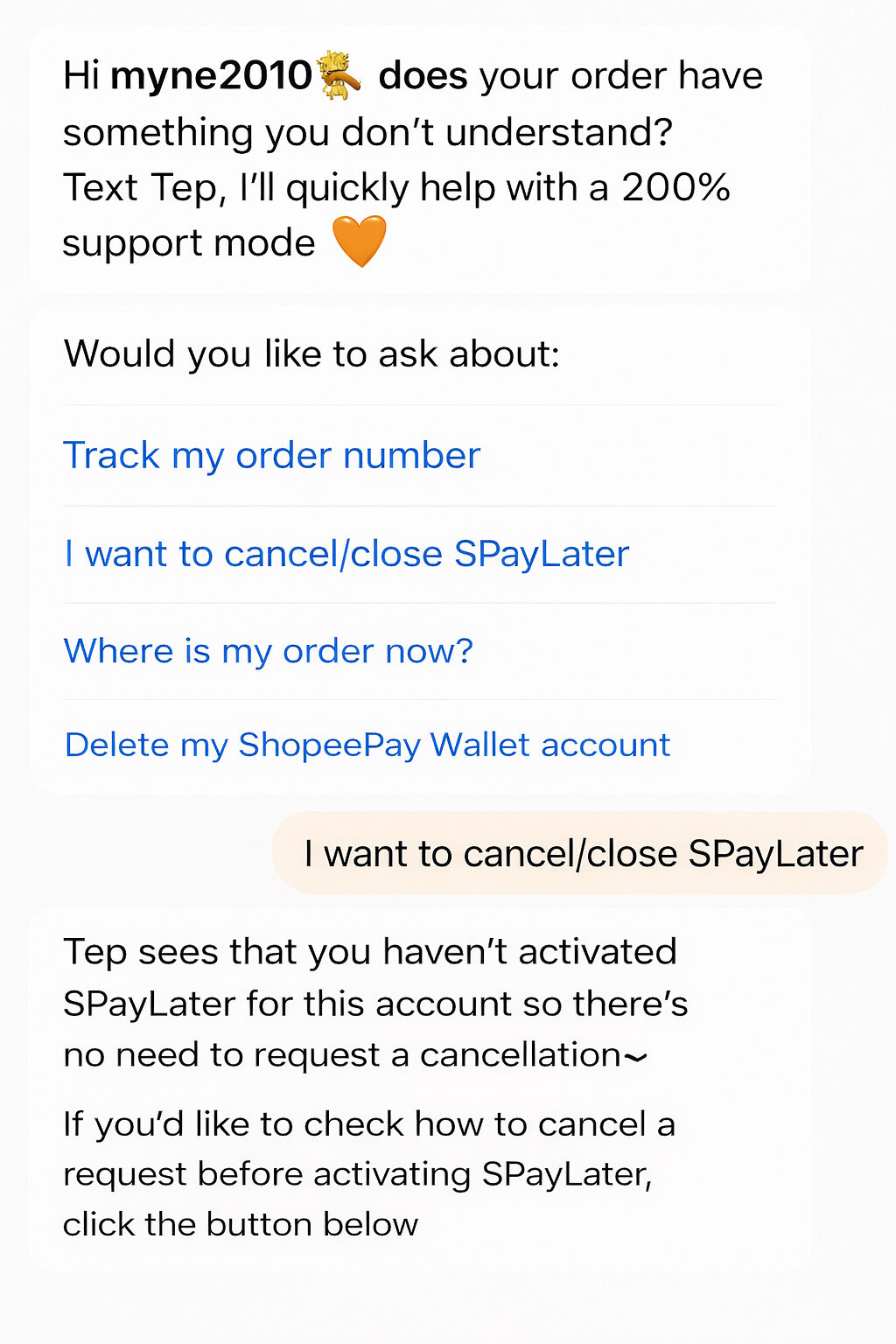
Figure 4.4. Domain-specific Bot, Cre: Shopee
Mandatory questions before coding
After identifying the type of chatbot, you need to clearly answer the following questions:
- Who is this chatbot for?
- What kind of questions will it answer?
- Does it need to remember conversation history or just answer individual questions?
- Does it require private data, or only general knowledge?
If these questions are not clearly answered, coding will easily go “off track”, making features harder to fix and expand.
4.2 Common mistakes when starting to build a chatbot
When first building a chatbot, many people encounter the same mistakes:
Expecting the chatbot to “understand” like a human
Chatbots have no awareness or emotions. They only process language and predict answers based on learned data. Expecting them to think like humans will lead to disappointment.
Example: You create a product consulting chatbot and ask:
“I want to buy a phone for my parents for convenience.”
Humans will naturally understand:
- Elderly users
- Prioritize ease of use, good battery, large text
But the chatbot may only latch onto the keyword “phone” and provide a list of popular products, not suitable for the context. This happens because chatbots lack life experience or social reasoning, and only analyze language patterns from training data.
Trusting the chatbot 100%
AI chatbots can give wrong answers but sound very convincing. Without control mechanisms, they may generate misleading information that users cannot easily detect.
Example: A learning chatbot is asked:
“In which case is this formula applied?”
It may respond with detailed explanations and technical terms, but the content could be wrong or outdated. If users don’t verify, this false information may be taken as fact.
The issue is not that the chatbot “lies,” but that it does not verify information, only predicts the most likely answer.
Not limiting scope
Wanting a chatbot to “answer everything” is a common mistake. The narrower the scope, the more effective and controllable the chatbot becomes.
Example: You say:
“My chatbot answers questions, gives advice, chats, and acts as a personal assistant.”
The result is usually:
- Rambling answers
- Unclear strengths
- Hard to control quality
In practice, a chatbot only performs well when its task scope is clearly defined. An FAQ chatbot is different from a scheduling chatbot, and both differ from a conversational chatbot.
Ignoring cost and security
When starting, many people focus only on “making it run,” forgetting backend issues.
Examples:
- Placing API keys directly in code and uploading to GitHub
- Not limiting the number of requests
- Not monitoring API usage costs
Consequences:
- API key leaks
- Unauthorized account usage
- Costs rising unexpectedly
These problems often appear after deployment, and fixing them later is much more costly.
4.3 When should you start making a demo?
A demo should not be the first step, but rather a way to test whether your idea is truly effective.
After clearly defining what the chatbot is for and who it serves, you can then think about making a small demo. A demo should begin once the chatbot’s purpose is clear and its scope narrowed. This is the time to check one simple but crucial question: Does this chatbot solve the problem I set out to address?
A good demo doesn’t need full features, beautiful UI, or perfect UX. Instead, it should focus on the chatbot’s core functionality. If the chatbot is meant to answer questions, test whether it answers correctly and consistently. If it is designed to support a task, check whether it completes that task smoothly.
The goal of a demo is not to create a finished product, but to help you detect early issues in the idea, scope, or approach. A simple but focused demo will save you a lot of time and effort when moving to full chatbot development.
5. Coding an AI Chatbot
After understanding how an AI chatbot works and what components it consists of, we will build a simple demo chatbot that runs on Google Colab.
Unlike the common approach of calling APIs from external services, this blog demonstrates a chatbot that loads and runs an AI model locally within the Google Colab environment. This approach helps us better understand how the model works internally and is well suited for research, experimentation, and learning—without relying on third-party APIs.
5.1. Installing required libraries
First, we need to install several essential libraries to load and run a language model directly on Google Colab:
-
transformers: Hugging Face’s library for loading and working with large language models
-
torch: the core deep learning framework used for tensor computation and model execution
-
accelerate: helps optimize model execution by managing CPU/GPU configuration, resource allocation, and inference acceleration with minimal setup
-
bitsandbytes: enables loading models in compressed formats (8-bit or 4-bit), significantly reducing memory usage on limited hardware
!pip install -q -U torch transformers accelerate bitsandbytes
5.2. Loading the language model
In this demo, we use the following model:
Qwen2.5-1.5B-Instruct
This model is:
-
Lightweight (~1.5B parameters)
-
Fine-tuned for conversational tasks
-
Suitable for demo
You can also explore and replace it with other suitable models available on Hugging Face
import torch
from transformers import AutoTokenizer, AutoModelForCausalLM, BitsAndBytesConfig

model_name = "Qwen/Qwen2.5-1.5B-Instruct"

# Setting this field to True will significantly speed up the code by leveraging Colab's T4 GPU, especially when the code is using an open-source model rather than calling an API.

use_gpu = False

print("⏳ Loading model ...")
if use_gpu==True:
    nf4_config = BitsAndBytesConfig(
                                    load_in_4bit=True,
                                    bnb_4bit_use_double_quant=True,
                                    bnb_4bit_quant_type="nf4",
                                    bnb_4bit_compute_dtype=torch.bfloat16,
                                    )
    model = AutoModelForCausalLM.from_pretrained(
        model_name,
        quantization_config=nf4_config,
        low_cpu_mem_usage =True
    )
else:
    model = AutoModelForCausalLM.from_pretrained(
        model_name,
        low_cpu_mem_usage =True
    )
tokenizer = AutoTokenizer.from_pretrained(model_name, return_token_type_ids=False)
print("⏳ Model successfully loaded")
5.3 A simple chatbot function
The processing flow of this function follows exactly the design principles discussed in the previous sections:
Receive input from the user
Wrap the input into a prompt
Send the prompt to the model
Receive and print the generated response
def local_chatbot():
    user_input = input("\n👤 User: ")
    if user_input.lower() in ['bye', 'exit']: return

    prompt = f"""<|im_start|>system
              You are a helpful AI assistant. Keep your answers concise and to the point.
              <|im_end|>
              <|im_start|>user
              {user_input}
              <|im_end|>
              <|im_start|>assistant
            """
    # Tokenize
    inputs = tokenizer(prompt, return_tensors="pt")

    # Generate
    outputs = model.generate(**inputs, max_new_tokens=200)

    # Decode
    response = tokenizer.decode(outputs[0])

    # Simple string processing for cleaner output
    print(f"🤖 Bot: {response.split("<|im_start|>assistant")[-1].strip().replace("<|im_end|>","")}")
    return response

response = local_chatbot()
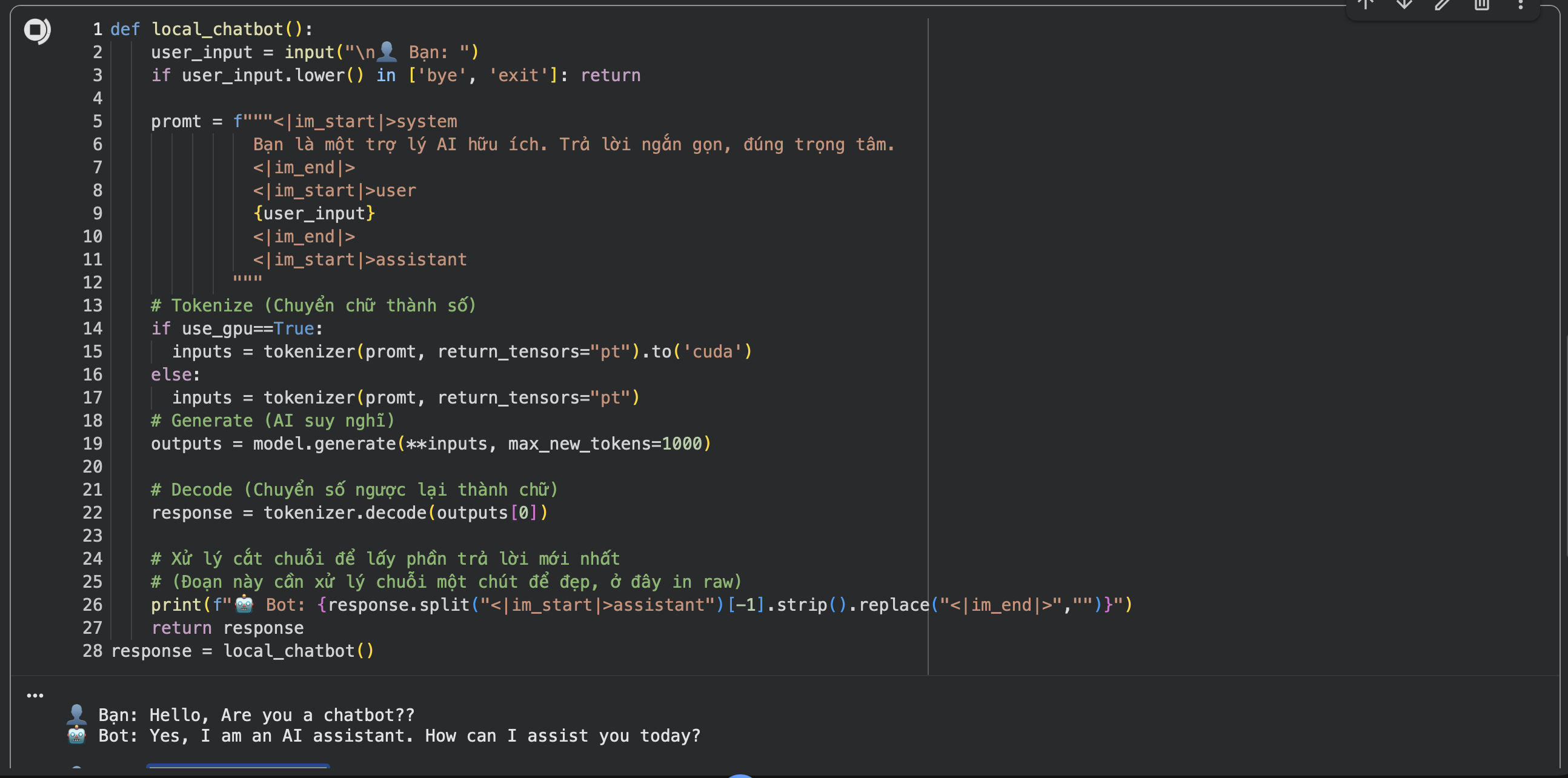
Figure 5.1. The Result
Full source code : Google Colab
6. Conclusion: Building a chatbot is a design problem before it is a coding problem
From this article, one key takeaway stands out:
Building an AI chatbot does not start with code but with design thinking.
Before writing any code, you should clearly answer a few fundamental questions:
-
What problem is the chatbot designed to solve?
-
Who are the primary users?
-
What is the scope of questions and answers?
-
Does it require domain-specific or private data?
When these questions are not clearly defined, starting to code too early often leads to:
-
Complex systems with low practical impact
-
Chatbots that respond vaguely and are hard to control
-
Higher deployment costs without addressing real user needs
On the other hand, when the design thinking is clear:
-
Technology choices become simpler and more purposeful
-
Code becomes merely the implementation of ideas
-
The system is easier to extend, optimize, and maintain in the long term
In the next blog post, we will build upon this simple demo to develop a more complete chatbot, and then deploy it on free platforms to run as a real, working demo product.
REFERENCES
Anthropic. (2025). Introducing Claude 4. https://www.anthropic.com/news/claude-4
AWS. (n.d.). What is Retrieval-Augmented Generation (RAG)? Amazon Web Services. https://aws.amazon.com/what-is/retrieval-augmented-generation
Google AI for Developers. (2026). Text generation | Gemini API. https://ai.google.dev/gemini-api/docs/text-generation
Hire A.I. Developers. (2025). Fine-tuning vs. from scratch: When to use the OpenAI API vs. building a custom LLM. https://hire-aidevelopers.com/blog/fine-tuning-llms-openai-api-vs-custom-llm
Hugging Face. (2026). Fine-tuning. https://huggingface.co/docs/transformers/en/training
Microsoft. (2025, February 13). 5 key features and benefits of retrieval augmented generation (RAG). Microsoft Cloud Blog. https://www.microsoft.com/en-us/microsoft-cloud/blog/2025/02/13/5-key-features-and-benefits-of-retrieval-augmented-generation-rag
OpenAI. (2025). OpenAI for developers in 2025. https://developers.openai.com/blog/openai-for-developers-2025
Rasiksuhail. (2026, January). The 2025 LLM API playbook: I tested all 4 major providers so you don't have to (Part 1/3: Choosing your stack). Medium. https://rasiksuhail.medium.com/the-2025-llm-api-playbook-i-tested-all-4-major-providers-so-you-dont-have-to-part-1-3-choosing-6dd11b47370b
ScienceDirect. (2025). A survey on chatbots and large language models: Testing and evaluation techniques. https://www.sciencedirect.com/science/article/pii/S2949719125000044
André Ribeiro(Jan 19, 2022). Develop a Conversational AI Bot in 4 simple steps.
https://towardsdatascience.com/develop-a-conversational-ai-bot-in-4-simple-steps-1b57e98372e2/
Chưa có bình luận nào. Hãy là người đầu tiên!